What an AI Background Generator Does
An AI background generator takes text prompts — or sometimes a reference image — and produces scene imagery: interiors, landscapes, abstract environments, architectural spaces, stylized settings. The output is a still or looping image you can layer behind subjects in a video.
What it doesn't do automatically: match the lighting of your foreground, account for the camera angle your character was shot at, or produce a depth map your editor can actually use. Those gaps are where most first-time attempts break.
The underlying process varies by tool. Some use diffusion models fine-tuned on environment datasets. Others let you steer style with reference images. Vidu's text-to-image tool generates backgrounds with prompt-based style control and supports reference uploads for consistency — useful when you need the same setting to recur across multiple scenes.
The core question isn't whether a tool can generate a background. Most can. The question is whether the output holds up when something is placed in front of it.

Why Backgrounds Matter in AI Video
A background isn't set dressing. It's doing structural work in every frame.
Scene Mood
Color temperature and environmental detail do most of the mood work in a scene before any character motion starts. A warm interior suggests safety or intimacy. An overcast exterior pushes tension. The problem with generated AI background outputs is that diffusion models default toward "pleasant" — slightly warm light, balanced exposure, no strong shadow direction. That default works for neutral content and is actively wrong for anything with emotional stakes.
In three consecutive generations of the same prompt ("foggy warehouse interior, industrial lighting, desaturated"), the first two came back with ambient fill light that softened everything. The third had harder shadows. I used the third. The prompt didn't change — the model varied. That's normal. It means you're budgeting for multiple generations per scene, not one.
Character Consistency
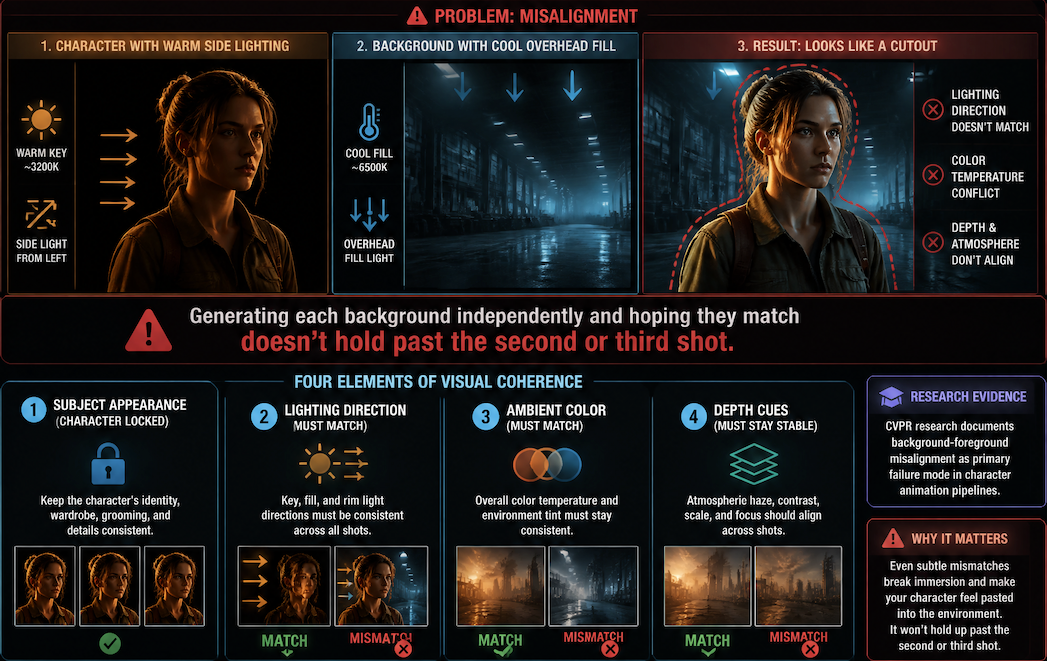
This is where background generation connects directly to the rest of the workflow. If your character was generated or composited under warm side lighting, a background with cool overhead fill reads as a different environment — and the character looks like a cutout, not someone standing in a space.
Maintaining consistent visual coherence requires more than locking down the subject appearance. The lighting direction, ambient color, and depth cues in the background need to stay stable across shots. Generating each background independently and hoping they match doesn't hold past the second or third shot. Research published in CVPR on video generation consistency documents how background-foreground misalignment is one of the primary failure modes in character animation pipelines.
Product Context
For product demos and ad content, the background is often doing most of the conversion work. The subject needs to read immediately against the environment. A cluttered or low-contrast background pulls attention from the product. Generated backgrounds here need to be intentionally simple — and "intentionally simple" is harder to prompt than it sounds, because models tend to fill space.
How to Create Video-Ready Backgrounds
The workflow is less about prompting skill and more about working backward from what the foreground needs.
Define Location and Style
Before writing a prompt, describe the foreground first: what's in it, what direction the light is coming from, what the camera angle is. The background prompt should answer those constraints, not just describe a setting.
An AI scenery generator works best when the prompt specifies lighting direction, time of day, palette, and depth structure — not just location type. "Forest path, late afternoon, golden backlight, shallow depth, warm tones" produces more usable results than "forest background." The specificity gives the model fewer degrees of freedom to fill in with defaults.
Style consistency across a multi-shot piece requires reference images. If you have one background that's working, upload it as a reference for the next generation rather than re-prompting from scratch. The deviation between consecutive generations from identical prompts is high enough that reference-guided generation is worth the extra step.

Match Foreground and Background
The most common failure point: the background was generated at a slightly different perspective angle than the foreground was captured or rendered at. A character shot from eye level placed against a background generated from a high angle reads wrong immediately.
Test the match before committing. Drop the background and foreground into your editing timeline at low opacity and check whether the horizon lines and vanishing points align. If they don't, regenerate — no amount of color grading fixes a perspective mismatch. Adobe's documentation on compositing and blending modes covers how edge treatments and light matching interact in layered footage; the relevant point is that highlight and shadow values in the background need to fall inside the range the foreground was captured under.
Test Background Motion
Static backgrounds work for static shots. For any camera movement — even a subtle push or drift — a still image reads as a flat plate and breaks the sense of depth.
If the scene has motion, the background needs motion too. Vidu's image-to-video pipeline can animate a still background into subtle looping motion — environment movement, light shifts, ambient texture — without a separate animation pass. The usability boundary: short clips under eight seconds hold well. Longer sequences start showing loop artifacts around the seven-second mark depending on content type.
Generate the background still first, evaluate it against the foreground, then animate once the composition is confirmed. Running animation on a background you haven't composited yet wastes generation time.
Common Background Mistakes
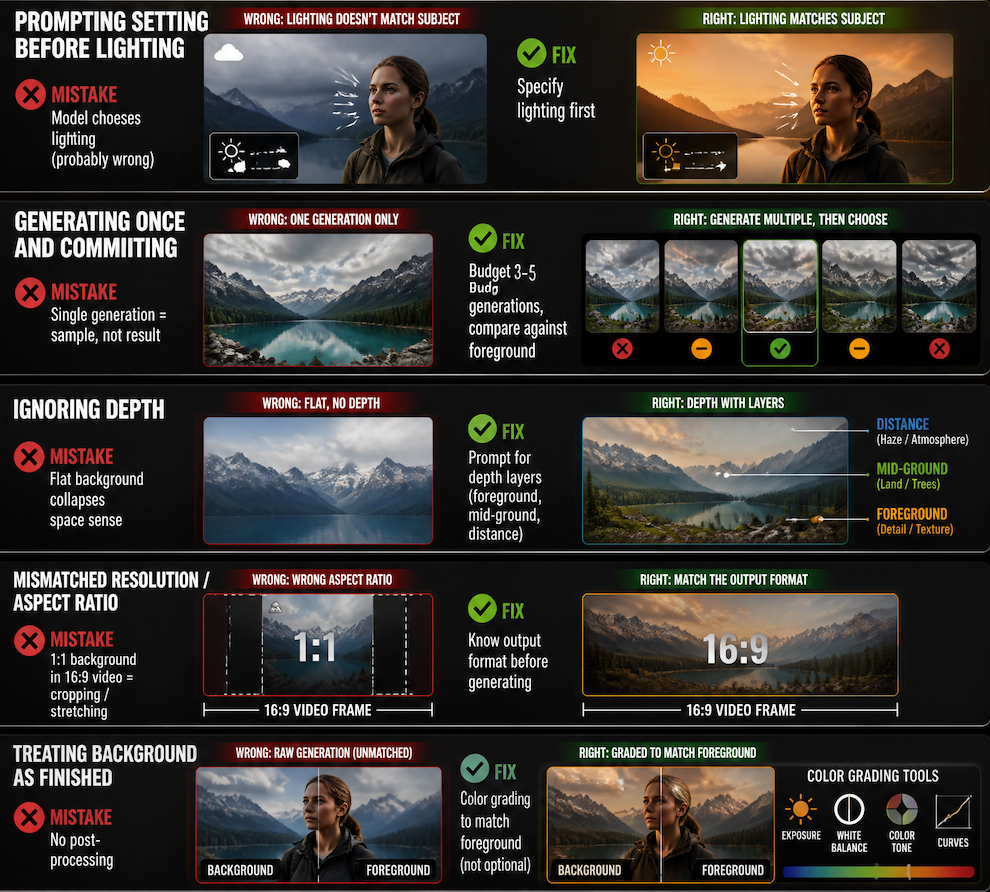
Prompting the setting before the lighting. The model will choose lighting for you and it will probably be wrong for your foreground. Specify lighting first.
Generating once and committing. Diffusion outputs vary. A single generation is a sample, not a result. Budget at least three to five generations per background and compare against the foreground before deciding.
Ignoring depth. A background that reads flat — no foreground elements, no mid-ground, no distance haze — collapses the sense of space when a subject is placed in front of it. Prompt for depth layers explicitly.
Mismatched resolution and aspect ratio. Generating a background at 1:1 and using it in a 16:9 video frame means cropping or stretching. Know your output format before generating.
Treating the background as finished after generation. A generated background almost always needs minor color grading to match the foreground. That step isn't optional — it's part of the workflow.