What Is Content Repurposing?
At its simplest, content repurposing is taking existing material — an image, a concept, a campaign — and reshaping it for different contexts without rebuilding from scratch each time.
For video, that traditionally meant trimming a long interview into short clips, or exporting the same edit in different aspect ratios. Useful, but limited. You were still bound by what existed in the original footage.
AI generation shifts that constraint. Instead of cutting what you have, you can generate new clips from what you have. The same character reference, the same background image, the same product photo — fed into different prompt structures — can produce clips that feel distinct even though they share a visual foundation.
That's a different category of efficiency than trimming. According to data from Sprout Social's content benchmarking research, brands published an average of 9.5 posts per day across social networks in 2024 — a volume that makes fully original production impossible for most teams. Repurposing isn't a shortcut. It's how production stays viable at that cadence.
The question AI video actually answers isn't "can I do more?" It's closer to: "how much usable output can I reliably extract from assets I already own?"
How AI Changes Repurposing Workflows
A traditional content repurposing tool — clipper, resizer, caption generator — works on existing video. It takes a finished output and adapts it. That's one layer.
A content repurposing AI that handles video generation adds a layer before that. It takes source material — images, reference sets, text descriptions — and creates video from them, which then gets adapted across platforms.
The practical difference: you're not limited to content that was filmed. You're working from assets that might be product photos, character illustrations, a brand color palette, or a single reference image of a face.
One image set to many clips
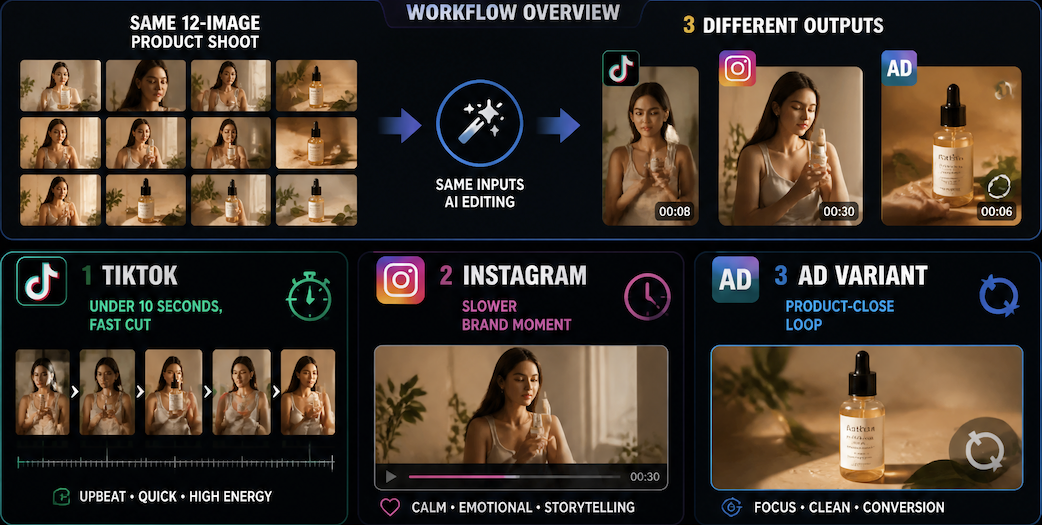
In three rounds of generation from the same twelve-image product shoot, I got clips that worked for TikTok (under ten seconds, fast cut), a slower brand moment for Instagram, and a product-close loop for an ad variant. Same inputs, same character — different prompt emphasis on motion speed and camera framing.
The instability point was motion. When the prompt specified complex hand movement, consistency broke across the clip. The character's proportions shifted in the second half. Removing the detailed motion instruction and letting the model handle pacing on its own — that's when the output held across all three variants.
One character across scenes
The more interesting test was running the same character reference through four different scene prompts: morning indoor light, outdoor afternoon, minimal studio, and a dark ambient setting.
In two of four, the character's face stayed consistent enough to read as the same person. In the other two — the outdoor and the dark ambient — the generation started drifting by the second scene. Skin tone shifted, facial structure got softer. The outdoor scene added lens flare the prompt didn't ask for.
So: two of four scene variants were usable for a multi-scene content repurposing strategy. Not a clean sweep, but enough to work with — especially if the workflow assumes some selection step before publishing.
One concept across formats
A single concept — a character interacting with a product — generated across Shorts-ratio (9:16), square (1:1), and widescreen (16:9) framing. The ratio itself wasn't the variable that broke things; the model handled framing crop reasonably. The variable that introduced inconsistency was duration. At four seconds, the clip held. At eight seconds in the same prompt, the second half started to deteriorate — background elements shifted, the product object changed shape.
Usable range for this scenario: four to six seconds per variant. Beyond that, the generation requires either a different prompt structure or an accept-and-trim approach.
Repurposing Workflow for Creators
This isn't a step-by-step tutorial on software settings. It's a description of what a generation-based repurposing pass actually looks like when the inputs are real production assets.
Map source assets
Before generating anything, the usable boundary starts with what the source assets can actually anchor. A clean, well-lit reference image with neutral background holds significantly better than a cropped or low-resolution one.
For the product shoot example: twelve images, but only seven had clean enough subject isolation to function as reference inputs. Those seven became the working set. The other five were out — feeding low-confidence reference images degraded consistency in every test run.
The content repurposing strategy at this stage is really an asset audit: what's strong enough to anchor generation, and what should be set aside. HubSpot's 2026 State of Marketing data notes that 35% of marketers are actively repurposing content across channels for consistency at scale — which only works when the source material is clean enough to hold through multiple output variants.

Generate platform-specific variants
Once the asset set is mapped, the generation pass focuses on one variable per round: duration, motion intensity, or scene framing — not all three at once. Running multiple variables simultaneously makes it harder to isolate what caused a deviation when the output doesn't hold.
In practice: generate duration-controlled variants first (four seconds works as a default for short-platform content), then rerun with scene framing adjusted, then assess motion. The selection step — keeping what's usable, flagging what isn't — takes longer than the generation itself.
Track what stays consistent
Across all generation rounds, the reference set should stay the same. Swapping out reference images mid-workflow introduces a new variable that's hard to control. If a character drifts, the cause is more likely prompt structure than a bad reference — changing the reference to "fix" it often makes the inconsistency worse or just moves it to a different part of the clip.
What to track: which clips held the character correctly, which scene prompts produced usable outputs, and at what duration the generation started to break. That tracking log is the actual content repurposing AI output — not just the video files, but the map of where the generation boundary sits for this particular asset set. Vidu's Reference to Video feature, which supports up to seven reference inputs simultaneously, is one structure for building this kind of consistent generation base without re-anchoring between runs.
What Not to Repurpose Blindly
AI video repurposing has clear limits that matter before you build a workflow around it.
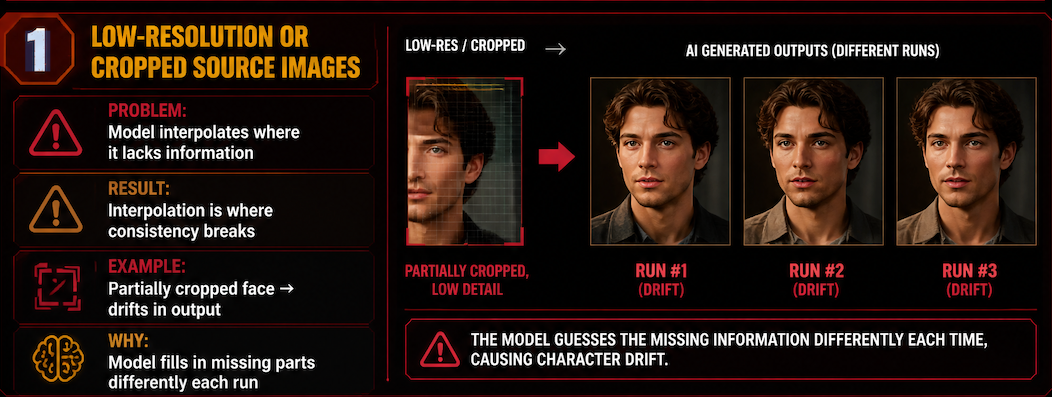
Low-resolution or cropped source images. The model interpolates where it lacks information. That interpolation is where consistency breaks. A character face that's partially cropped in the reference image will drift in the generated output — the model fills in what's missing differently each run.
Complex multi-person scenes. In three tests with two-character reference inputs, one character consistently held and the other drifted. Which one drifted changed between runs. Multi-character consistency in a single clip is not a stable output condition with current generation, at least not beyond four to five seconds.
High-detail product close-ups. Logos, text, fine product detail — these don't hold at normal generation fidelity. A product clip where the label needs to be legible is not a good candidate for AI repurposing without a compositing step after generation. This matters for teams building content repurposing strategy around branded product content specifically.
Content where tone matters more than motion. If a clip is carrying emotional weight through dialogue, pacing, or performance nuance — AI video generation isn't adding to that. It's generating motion, not meaning. Repurposing works on clips where the visual layer carries the content; it doesn't replace editorial judgment about what a moment means.