What AI Marketing Videos Are Good For
The honest answer: fast iteration and concept generation, not finished broadcast production.
AI tools produce marketing videos that work well as social assets and campaign concepts — the kind of content that fills a content calendar without consuming a full production budget. Wyzowl's 2026 video marketing statistics show 63% of video marketers now use AI tools to create or edit video, up from 51% the previous year. A still image can become a 5–8 second clip with motion, atmosphere, and a visual hook. A text brief can generate a rough visual concept before anyone opens an editing timeline.
Where it breaks down is when the ask gets complex. Multi-person scenes, precise brand typography overlaid, legally regulated product categories, or anything requiring frame-accurate lip-sync — those need more than an AI generation pass. The output from a single run usually isn't the final asset. It's the starting point.
For small teams doing video marketing on tight cycles, that starting point is worth a lot.
Best Use Cases for Small Teams
Product reveals
A static product photo going into a generation tool and coming out as a slowly rotating, subtly lit clip — that works. Stability holds well on single-object shots. In tests with a clean product image and a neutral background prompt, 3 out of 4 generations were usable without additional editing. The fourth had unwanted motion blur on the label.
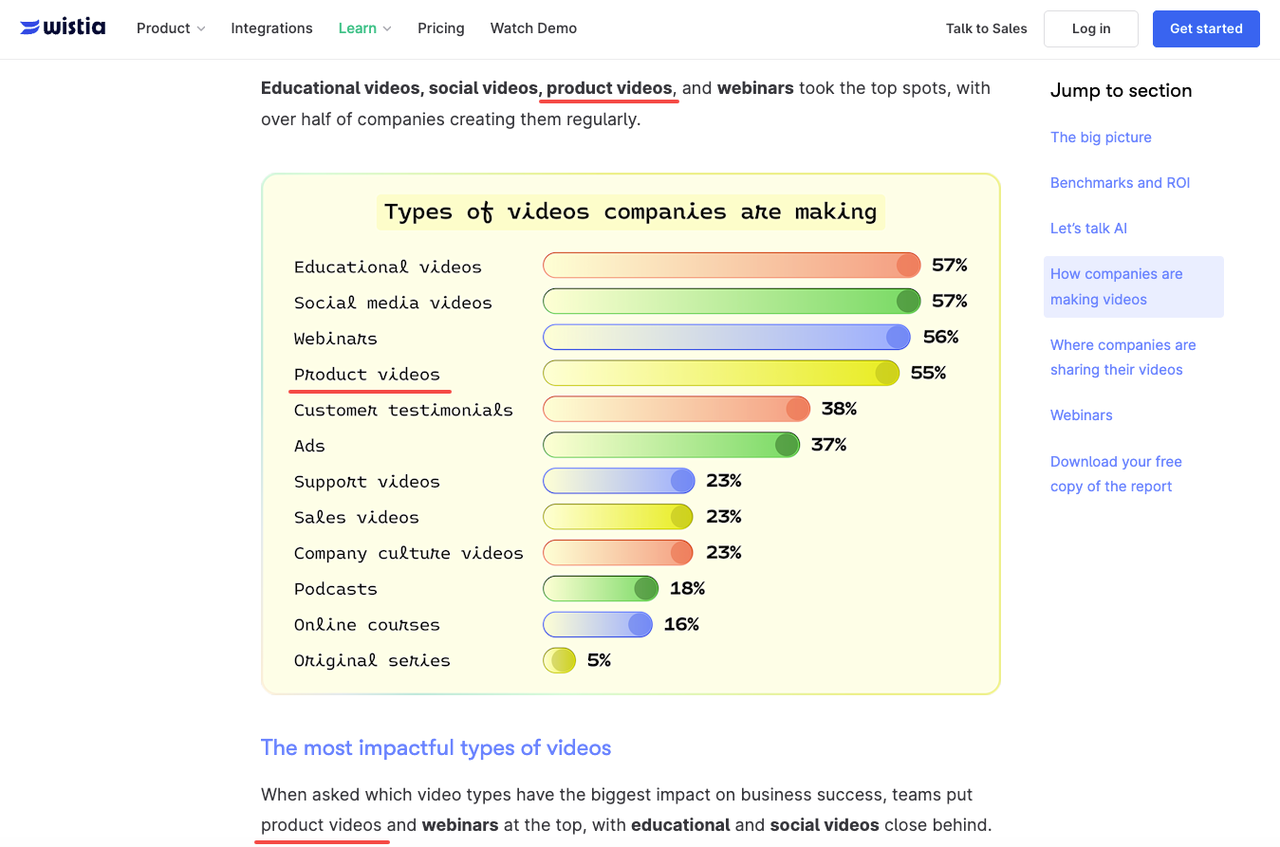
This is a practical fit for e-commerce teams producing product video at volume — Wistia's State of Video 2026 ranks product videos among the formats with the highest impact on business success. The constraint: consistency across a product line requires reference inputs per item, not just one master prompt.
Social ads
Short-form social ads — the kind running on Reels, TikTok, or Shorts at 6–15 seconds — are where an AI marketing video generator holds its value most reliably. The format forgives some imperfection. A slightly drifting background reads as "aesthetic" in a vertical scroll context where it would look wrong in a broadcast spot.
Generating multiple marketing videos from the same source image is faster than briefing a video editor for each creative variant. The team still needs to write copy, add captions, and QC the output — but the motion asset comes in faster.
Launch teasers
A promotional video maker approach works well for teasers: atmospheric, suggestive, not reliant on precise product detail. Text-to-video or image-to-video for a launch teaser gives you motion and mood before the product is fully photographed. That's useful for pre-launch social content where the goal is attention, not specification.
Stability on abstract or environmental prompts tends to be higher than on face-forward character scenes. Teasers lean atmospheric by nature — that plays to AI's current strengths.
UGC-style concepts
Generating UGC-style concept clips for briefs or internal decks — not for final publication as real user content — is a valid use. Showing a creative director what tone you're going for, or illustrating a brief without hiring a creator for a concept test, saves rounds of back-and-forth. Divergence starts appearing from this round when the concept moves toward actual deployment, which requires real creator involvement for authenticity.
How to Create Marketing Videos With AI
Start from product or reference images
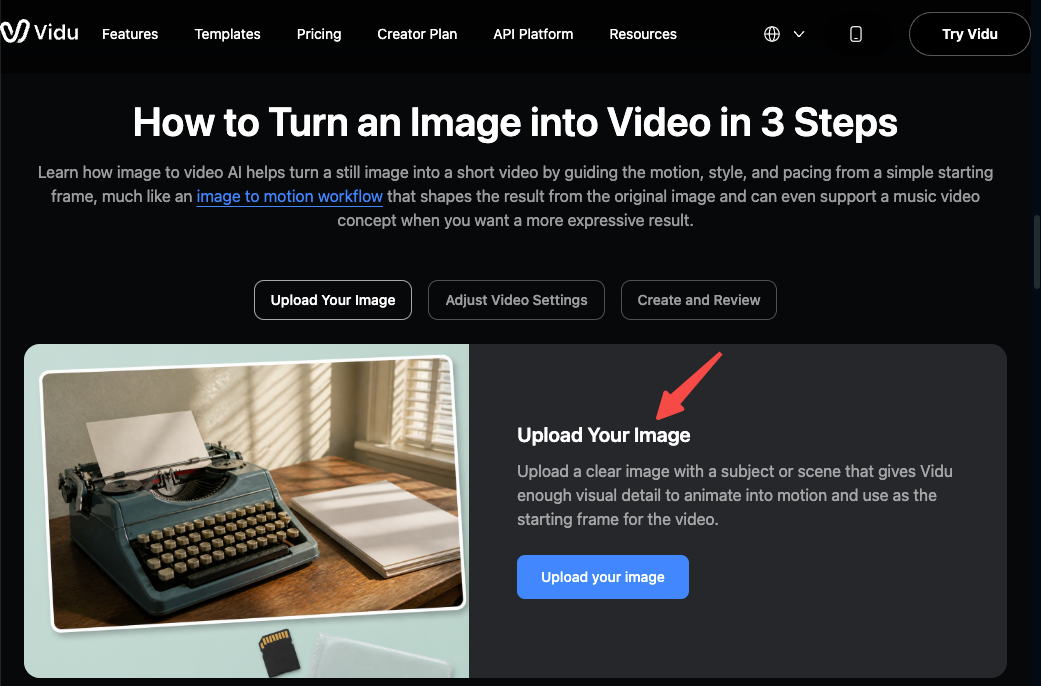
Text-only prompts produce higher variance. Starting from product images or reference images produces outputs closer to what the team actually needs for a specific brief.
In Vidu, the Reference to Video and Image to Video inputs let you upload existing assets as the generation anchor. Uploading 2–3 reference images for style, object, and context consistently outperformed single-image inputs in terms of first-pass usability. The multi-reference consistency feature reduces drift across a short series of clips — relevant when a team needs 3–5 assets from the same visual identity.
Choose platform format
Format decisions before generation save editing time after. Vertical (9:16) for Reels, TikTok, Shorts. Horizontal (16:9) for YouTube pre-roll or display. Square (1:1) for feed posts. Setting this at generation stage keeps the composition intentional rather than cropped to fit later.
Shorter clips — 5–8 seconds — tend to be more stable than 15–20 second generations. Generating in short segments and joining them in an editor holds quality better than pushing a single long generation.
Check claims, brand fit, and rights
This step gets skipped and causes problems. Three things to verify before any AI-generated clip goes into paid distribution:
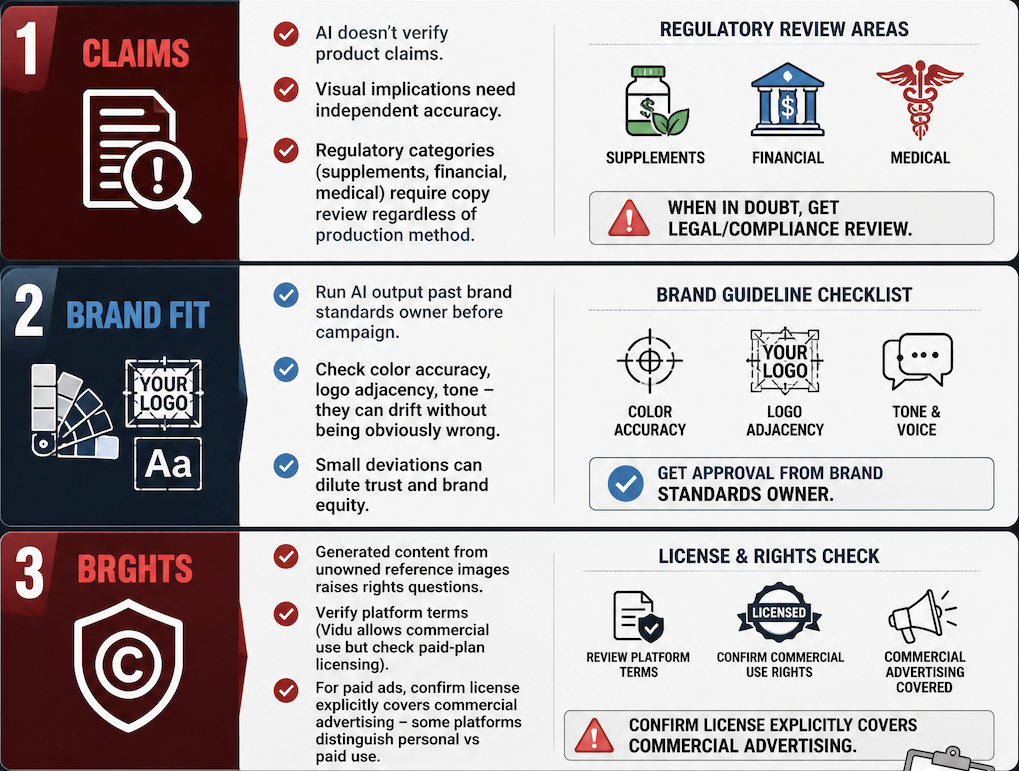
Claims: AI generation doesn't verify product claims. If the visual implies a product does something specific, that claim needs to be independently accurate. Regulatory categories — supplements, financial products, medical devices — require copy review regardless of how the visual was produced.
Brand fit: Run AI output past whoever owns brand standards before it goes into campaign rotation. Color accuracy, logo adjacency, and tone can all drift from brand guidelines without being obviously wrong on first view.
Rights: Generated content from reference images you don't own introduces rights questions. Vidu's platform terms of use don't restrict commercial use, but paid-plan licensing and input ownership obligations still apply — verify current terms directly, because these evolve. For paid ad placements specifically, confirm the generation tool's license explicitly covers commercial advertising use. Some platforms distinguish between personal creative use and paid distribution.
Limits to Verify Before Publishing
AI generation is not the same as commercial video production with a production team. The limits worth knowing:
Consistency across long campaigns. A single AI-generated visual can look strong. Maintaining that look across 20 assets over a 3-month campaign, with a consistent character or brand element, is harder. Plan for iteration and human QC at each production stage.
Platform ad policies. Meta, Google, and TikTok all have policies on AI-generated content in paid ads. These policies are actively evolving — what's acceptable today may have different disclosure requirements in six months. Check current policies on each platform before committing a campaign budget. IAB's AI Transparency and Disclosure Framework and their video compliance brief both cover the current state of AI disclosure requirements in advertising — worth reading before making commitments.
Audio. Most AI video tools either produce no audio or generate music that requires additional licensing verification for commercial use. Plan the audio layer separately.
Legal review for regulated categories. If the product falls into a regulated category, legal review applies to AI-generated video the same way it applies to any campaign asset.